fedRBE
fedRBE Documentation
| How-To-Start Guide | Reproduce the Paper | Tool README | Local Tests |
 |
 |
 |
 |
Federated limma remove batch effect (fedRBE)


Table of Contents
- Architecture overview
- Installation
- Usage
- Reproducing the paper
- Single-machine simulation
- Troubleshooting
- License
- How to cite
- Contact information
Architecture overview
The Federated Limma Remove Batch Effect (fedRBE) app runs limma’s removeBatchEffect in a FeatureCloud workflow. Raw data stays at each client site, while Secure Multiparty Computation (SMPC) aggregates the summary statistics needed for batch effect correction.
fedRBE allows multiple participants to collaboratively remove batch effects from their data without sharing raw data, ensuring privacy. It effectively eliminates non-biological variations arising from different sources such as labs, time points, or technologies, using limma’s removeBatchEffect. The tool supports various data formats and seamlessly integrates with the FeatureCloud platform for streamlined workflow management.
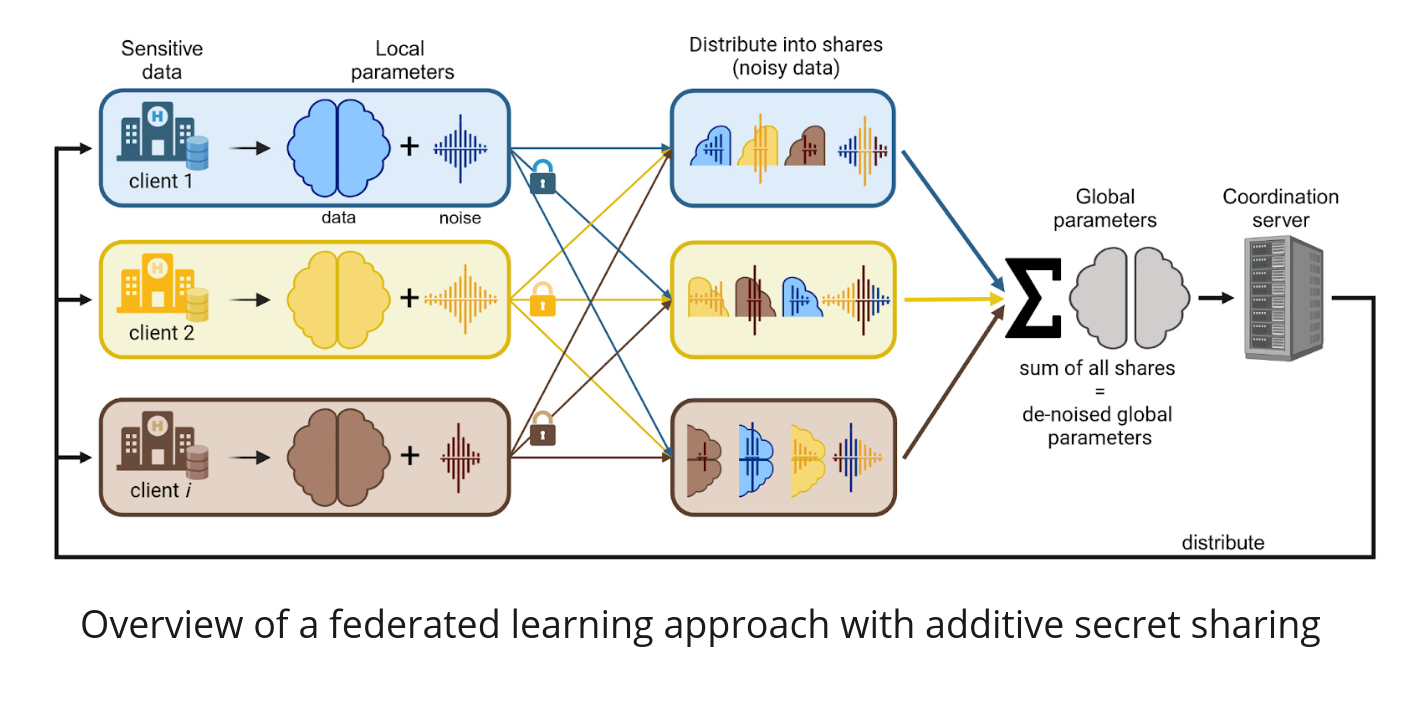
fedRBE app states. Source: ArXiv 2412.05894
The repository has two main parts:
- fedRBE app:
batchcorrection/contains the FeatureCloud app. - Reproducibility analysis:
evaluation_data/,evaluation/, and analysis folders reproduce the results from the ArXiv preprint.
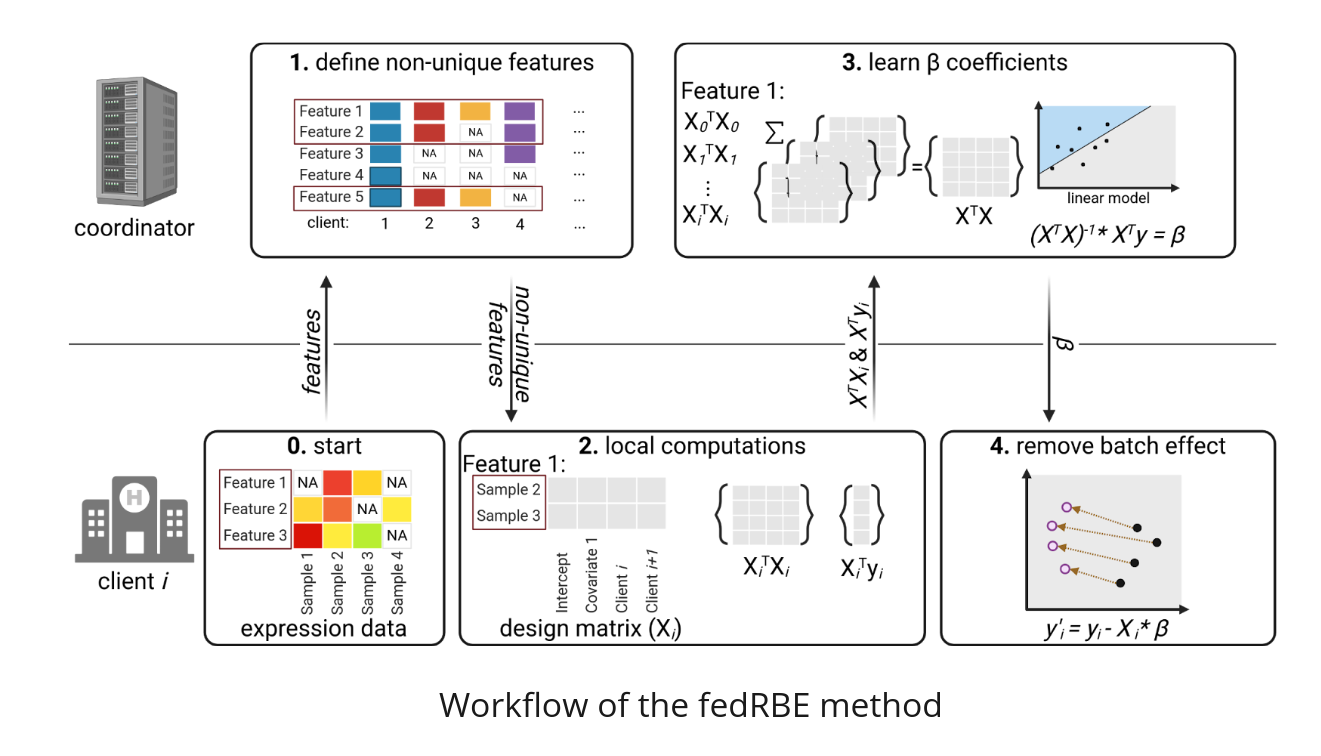
fedRBE architecture. Source: ArXiv 2412.05894
The app is available on FeatureCloud. For setup, workflow, and implementation details, see the How To Guide and the app README.
Installation
Prerequisites
Before installing fedRBE, ensure you have the following installed:
- Docker: Installation Instructions
- Either Conda or Mamba for
environment.yml, or separate Python 3.8+ and R 4.0+ installations.
Additional requirements depend on the use case:
- Running fedRBE in a federated manner via the FeatureCloud platform: FeatureCloud account
- Reproducing the paper: Git LFS and R dependencies from
requirements_r.txt
For Windows users, we recommend using WSL.
Clone the repository
Clone the repository to run local simulations or reproduce the analysis:
git clone https://github.com/Freddsle/fedRBE.git
cd fedRBE
Then choose one dependency setup.
Using Conda or Mamba:
conda env create -f environment.yml
conda activate fedRBE
Mamba can use the same environment.yml. The file pins
conda-forge::openblas=0.3.3 to avoid pthread_create() failures in
affy::rma() for conda environments. If that older build cannot be resolved
for your platform, use the preprocessCore source-install command in the
reproduction guide.
Using separate Python and R installations:
python3 -m venv fedrbe_env
source fedrbe_env/bin/activate   # on Windows: fedrbe_env\Scripts\activate
pip install -r requirements.txt
For full paper reproduction, install the R packages from requirements_r.txt; see
Reproduce the fedRBE Preprint for the exact
CRAN, Bioconductor, preprocessCore, and GitHub installation commands.
The checkout includes example files, simulation scripts, and evaluation workflows.
Usage
Quick start
To run fedRBE with sample data:
- Install the prerequisites.
- Run the sample experiment script:
python3 run_sample_experiment.pyThis runs fedRBE on a simulated example dataset.
For other usage modes:
- Multi-machine collaboration: How To Guide
- Local FeatureCloud test environment: Local Test Guide
Glossary & further resources
- FeatureCloud: A platform enabling federated analyses. FeatureCloud docs
- limma: A popular R package for differential expression analysis.
removeBatchEffectis a function from limma.
For advanced configuration details, see the app README and the ArXiv preprint.
If you encounter errors:
- Check the logs for error messages.
- Revisit the app README.
- Open an issue on the GitHub repository.
Input and Output
For file preparation, format, configuration, and output details, see the How To Guide.
In summary, you need two main inputs and one optional file:
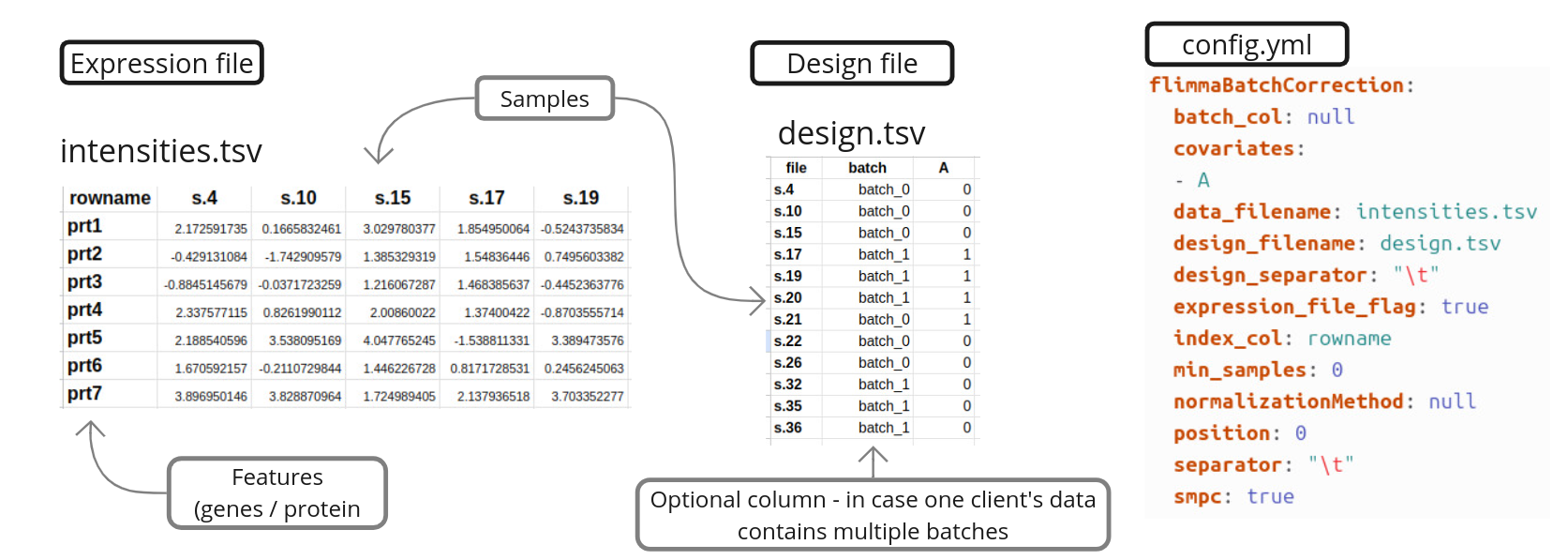
Input files required for fedRBE.
Output files include:
- Corrected Data: The batch-corrected data in the same format as the input.
- Corrected Data with covariates: Corrected data with unchanged covariate columns.
- Report: A summary of the correction process and results.
Configuration
config.yml controls data formats, normalization, SMPC, privacy thresholds, and batch settings.
Example config.yml:
   flimmaBatchCorrection:
      data_filename: "expression_data_client1.csv"
      expression_file_flag: True
      index_col: "GeneIDs"
      covariates: ["Pyr"]
      separator: ","
      design_separator: ","
      normalizationMethod: "log2(x+1)"
      smpc: True
      min_samples: 2
      position: 1
      reference_batch: ""
For a comprehensive list of configuration options, refer to the Configuration Section in the batchcorrection README.
Reproducing the paper
This repository includes the code and data needed to reproduce the analyses in the ArXiv preprint.
For detailed instructions on reproducing the paper, refer to the Reproducibility Guide.
Single-machine simulation
To simulate a federated workflow on a single machine using provided sample data:
Option 1: Using the helper python script
For sample data, use the Quick Start.
Option 2: Using the FeatureCloud Simulation framework
Use the Local Test Guide to run a simulation with correctly formatted test data.
Troubleshooting
Common checks:
- Missing Files: Ensure
config.ymland data files are in the correct directory. - Incorrect Format: Verify
expression_file_flagandindex_colsettings inconfig.yml. - No Output Produced: Check
report.txtand logs for error messages. - Errors with Test runs: Ensure there are no leftover running Docker containers. Restart Docker or the system if necessary.
For detailed troubleshooting tips, refer to the How To Guide.
License
This project is licensed under the Apache License 2.0.
How to cite
If you use fedRBE in your research, please cite our ArXiv preprint:
Burankova, Y., Klemm, J., Lohmann, J.J., Taheri, A., Probul, N., Baumbach, J. and Zolotareva, O., 2024. FedRBE–a decentralized privacy-preserving federated batch effect correction tool for omics data based on limma. arXiv preprint arXiv:2412.05894.
   @misc{burankova2024fedrbedecentralizedprivacypreserving,
         title={FedRBE -- a decentralized privacy-preserving federated batch effect correction tool for omics data based on limma},
         author={Yuliya Burankova and Julian Klemm and Jens J. G. Lohmann and Ahmad Taheri and Niklas Probul and Jan Baumbach and Olga Zolotareva},
         year={2024},
         eprint={2412.05894},
         archivePrefix={arXiv},
         primaryClass={q-bio.QM},
         url={https://arxiv.org/abs/2412.05894},
   }
Contact information
For questions, issues, or support, please open an issue on the GitHub repository.